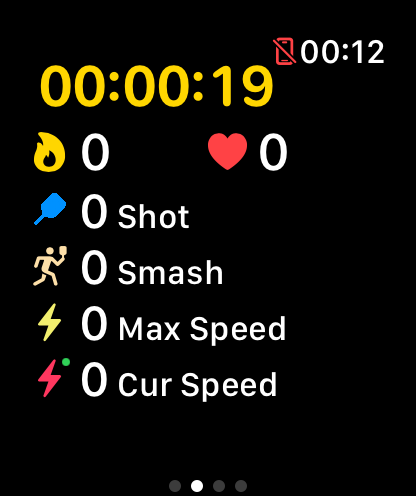
Automatically recognizes smashes, clears, drops, lifts and drives, so every shot is classified — see your smash count at a glance.
⌚ Apple Watch Badminton App
Track every badminton game
Track every badminton game
on your Apple Watch
GoodShot is the AI badminton coach built for Apple Watch. Wear it on your racket hand and it recognizes smashes, clears and drops, logs swing speed and heart rate — then hands you the full analysis on your iPhone.
Free download · iPhone + Apple Watch
Download on the
App Store
Key Features
A complete badminton tracker on your wrist
No manual scorekeeping, no video review. The AI on your Apple Watch organizes every shot while you play.
Records the speed of every swing and builds a speed distribution — find out exactly how fast your smash really is.
Distinguishes forehand from backhand and overhead from underhand shots, revealing the weak spots in your technique.
Monitors heart rate zones in real time and calculates calories precisely, so you know whether each session hit the right intensity.
Review training trends by day, week, month and year, and track every bit of progress in swing speed and smash count.
Workout time, heart rate and calories are written to Apple Health automatically, unified with the rest of your fitness data.
Get Started
Four steps to your first tracked game
1
Install on iPhone
Download GoodShot free from the App Store.
2
Add the watch app
Install the GoodShot watch app on your Apple Watch.
3
Wear on racket hand
Wear the watch on your racket hand and start recording.
4
Review on iPhone
After the game, open the iPhone app for the full analysis.
FAQ
Tracking badminton on Apple Watch
How do I track badminton with Apple Watch?
Install GoodShot on your iPhone, add the watch app to your Apple Watch, wear the watch on your racket hand, and start a session on the watch before you play. After the game, open the iPhone app to review the full analysis.
Which Apple Watch models are supported?
GoodShot supports mainstream Apple Watch models running a recent watchOS, including the Apple Watch Series lineup, Apple Watch SE and Apple Watch Ultra. Newer watches deliver smoother swing recognition.
Which badminton shots can it recognize?
The AI automatically recognizes smashes, clears, drops, lifts and drives, distinguishes forehand from backhand as well as overhead from underhand shots, and records the speed of every swing.
Does my data sync to iPhone and Apple Health?
Yes. Sessions recorded on the watch sync automatically to the GoodShot app on your iPhone, and workout duration, heart rate and calories are written to Apple Health alongside your other fitness data.
Do I need my iPhone on the court?
No. All recording happens on the Apple Watch on your wrist. Leave your iPhone off court and open the app afterwards to see your results.
Is GoodShot free?
GoodShot is free to download with core tracking features included. A PRO membership unlocks advanced analytics, historical trends and full reports.
Let Apple Watch track your next game
Download GoodShot free, strap on your watch and hit the court — every smash, recorded.
Download on the
App Store